3.3 Analyzing Dependencies
Dependencies define points in a hierarchy that rely on elements from other branches, or indicate an implied relationship. Based on selections described in previous section (such as ) these relationships could contribute to state.
Dependencies are relationships that display in the Operations Center Relationship browser. To open the Relationship Browser, right-click an element, then select . For more information about using the Relationship Browser, see Section 6.0, Understanding Element Relationships.
Use an element’s option to quickly view an element’s dependency relationships and navigate to one of the end-point elements named in a relationship.
To view an element’s nonparent/child dependencies:
-
In the pane, right-click an element in the hierarchy, then select .
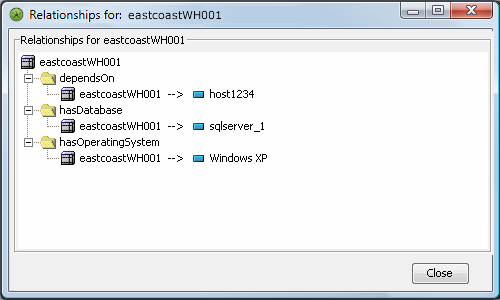
The Relationships dialog box displays the element, and its dependent relationships:
-
To navigate to one of the elements listed as an end-point in the Relationships dialog box, double-click the element.
The element is selected in the pane. For example, in the illustration in Step 1, double-click the operating system relationship to navigate to the element in the pane.