2.4 Managing User Profiles
Administrators can modify a user profile by performing these functions:
-
Lock: Retains a user’s preferences such as element bookmarks and color settings.
-
Copy: Copies a user’s profile to another user or set of users.
-
Clear: Deletes the user’s profile and the associated user preferences.
To manage user profiles:
2.4.1 Modifying a User Profile
To lock and/or copy a user profile:
-
In the pane, expand the root element > > .
-
Right-click the user account name and select to open the property page.
-
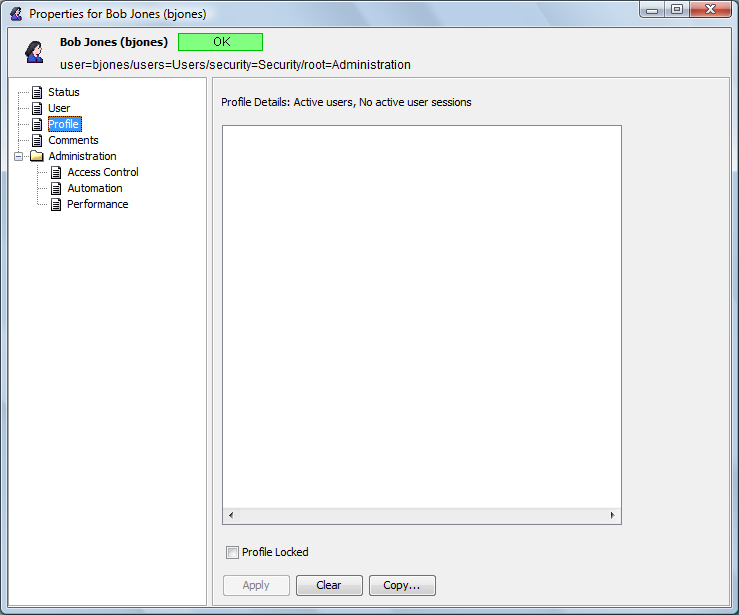
In the left pane, click to open the property page:
-
To lock the profile and retain the user preference settings, select , then click .
-
To copy the profile to one or more other users, do the following:
-
Click to open the dialog box.
-
Select the target user account for copying the profile.
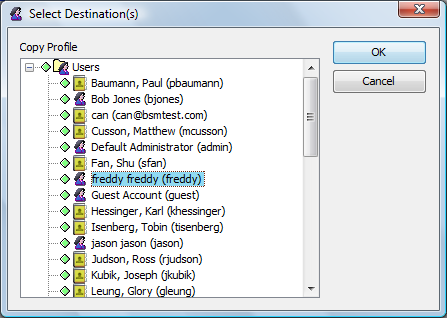
Use the Ctrl key to select more than one user account. Use the Shift key to select a group of contiguous user accounts.
-
-
Click .
The profile is copied to the selected user accounts.
2.4.2 Deleting a User Profile
To delete a user profile:
-
Select a user profile in the Profiles property sheet, then click .
-
Click in the confirmation dialog box.