5.1 Using Packages

Packages are the delivery mechanism for Identity Manager content. It is a container for components of Identity Manager driver content, organized according to the functionality you want to provide to a driver. Packages can contain different types of content that you can move from one environment to another, allowing you to re-use content in multiple places and create and configure drivers more efficiently.

Figure 5-1 Identity Manager Package
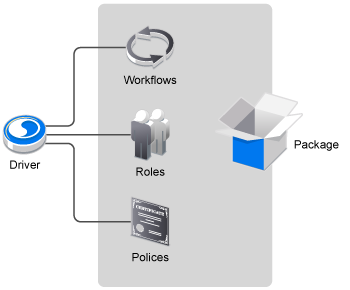
In NetIQ Identity Package Deployment Tool (PDT), the packages are stored in the package catalog, which is accessible via the Packages menu. Packages must be imported into the package catalog, then the packages are installed on the Identity Vault, driver sets, or drivers. The package catalog is an object that is only displayed in PDT and it holds all of the packages that are installed in staging environments.

PDT allows you to manage and work with packages. Packages are typically in a .jar file format. This enables you to easily import packages into PDT and then deploy into different staging environments. For more information about how to manage packages, see Section 6.0, Managing Installed Packages.

For more information about how packages work, see the following sections:

5.1.1 Advantages of Packages

Easy to upgrade: Packages allow you to upgrade an installed package.

Easy to revert to factory settings: Packages are easy to install, uninstall, and revert to a shipping configuration of the driver.

Easy to reuse common functionalities: Packages allow you to group common functions in a particular package, which can be referenced by other drivers.

Easy content life cycle management: Packages allow you to manage the life cycle of the content due to versioning.

Easy to update: Packages allow you to update the features of a driver without updating the entire driver.

5.1.2 Package Content

Packages are installed on drivers, driver sets, and Identity Vaults. The content of the packages installed on the Identity Vault can affect all of the drivers in the Identity Vault. The content of the packages installed on the driver set can affect all of the drivers in the driver set. The content of the packages installed on a driver only affects that driver.

You can store many different types of objects in a package, including driver objects, library objects, User Application objects, DS object resources, filter extension resources, and package prompt resources. The types of objects you can store in a package depends on the type of the package itself.

NOTE:You can install content on a driver without adding that content to a package, including policies, ECMAScripts, and GCVs. However, if you install content directly on a driver, you cannot control what order the driver runs the content.

For example, if you have a package that contains 10 policies installed on a driver, and one non-package policy also installed on that driver, the non-package policy may run in between two of the package policies, regardless of how you order the policies.

The following table lists the objects that can be installed in the different package types.

Table 5-1 Package Content in Package Types

Object Type/Package Type

Driver

Driver Set

Identity Vault

Notification Templates


X

Library

X1

X1

Credential Application object

X

X2

X2

Credential Repository object

X

X2

X2

DirXML Script

X

X2

X2

ECMAScript

X

X2

X2

Mapping Table

X

X2

X2

Global Configuration object

X

X

X2

DS object

X

X

X2

Resource object

X

X2

X2

Schema Map

X

X2

X2

XSLT

X

X2

X2

Job

X

X


Entitlement

X


Entities

X3


Lists

X3


Queries

X3


Relationships

X3


Configuration

X3


Provisioning Request Definitions

X3


Teams

X3


Roles

X3


Role Configuration

X3


Resources

X3


Separation of Duty (SoDs)

X3


1 Libraries are not packaged, only their contents. Packages store the library's name and location and create it at install time, if it doesn't already exist.

2 These items can only be added to a package of the respective type if they are in a library.

3 These items can only be added to a User Application driver package.

5.1.3 Understanding Package Dependencies

Many packages require one or more other packages to function properly. When you install a package, the package may require other packages also be installed, either as feature sub-packages or separate packages entirely. For example, several packages require you to install the default Common Settings package before installing or deploying.

These dependencies are mandatory and are always enforced, indicating a technical dependency one package has for a component of another package.

Understanding Driver Set Packages and Identity Vault Packages

A package can be a driver package, a driver set package, or an Identity Vault package. In general, package dependencies have a one-way “pyramid” structure. Driver packages can require other driver packages, driver set packages, or Identity Vault packages, and driver set packages can also require Identity Vault packages. However, Identity Vault packages cannot require driver or driver set packages, and driver set packages cannot require driver packages.

Understanding Base Packages and Feature Packages

In addition, a package can be a base package or a feature package. Feature packages contain the actual functionality a driver uses, broken apart by “feature,” while base packages tell PDT how to assemble those feature sub-packages together into an actual driver. Base packages should be used to create a driver and not to deliver content.

Feature packages themselves may be mandatory or optional, depending on the requirements of the base package. Some features may not be strictly necessary for a driver to function but could be useful for some users, while other features are required for the driver to function properly.

You configure the mandatory and optional feature packages in the Properties of the base package. When you install a driver, the Driver Configuration Wizard displays both the mandatory and optional features of that driver’s base package and installs the mandatory feature packages and allows you to select which optional feature packages you want to install.