16.0 Sample Identity Applications Cluster Deployment Solution on Tomcat Application Server
This chapter provides instructions on how to configure the identity applications into a cluster environment on Tomcat with an example deployment.
To build a cluster, you need to group several Tomcat instances (nodes) together. If an active server fails, the identity applications are accessible through other cluster nodes. For failover, you can create a cluster of the identity applications and configure them to act as a single server. However, this configuration does not include Identity Reporting.
It is recommended to use a load balancer software that processes all user requests and dispatches them to the server nodes in the cluster. The load balancer is typically part of the cluster. It understands the cluster configuration as well as failover policies. You can select a solution that best suits you.
Figure 16-1 shows a sample deployment with a two-node cluster with the following assumptions:
-
All the communication is routed through the load balancer.
-
Components such as OpenText Identity Manager engine and the User Application are installed on separate servers. This is a recommended approach for a production-level deployment.
-
You are familiar with the installation procedures for OpenText eDirectory, OpenText Identity Manager engine, identity applications, Tomcat application server, and databases for the User Application.
-
SSPR (Single Sign-On Password Reset) is installed on a separate computer. For a production-level deployment, this is the recommended approach.
-
PostgreSQL is used as a database for the User Application. However, you can use any of the supported databases, such as Oracle or MsSQL.
-
All the User Application nodes communicate to the same instance of OpenText eDirectory and the User Application database. Based on your requirement, you can increase the number of User Application instances.
Figure 16-1 Sample cluster deployment solution
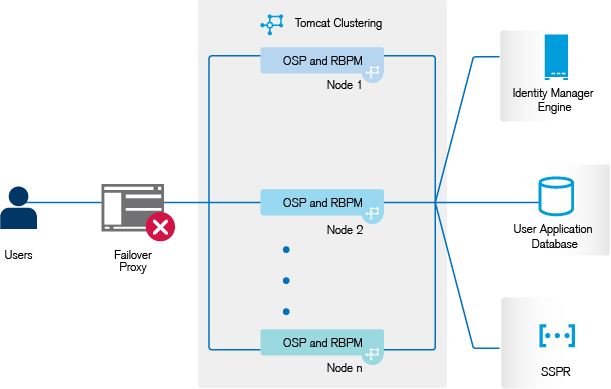
NOTE:A two-node cluster is the minimum configuration used for high availability. However, the concepts in this section can easily be extended to a cluster with additional nodes.
To help you understand the step-by-step configuration, this sample deployment is referred throughout the subsequent sections of the document.