6.2 Creating and Managing the Results Objects
The results are stored as objects in an LDAP directory. These objects are used to sort, categorize, or define the test objects that are created. These objects, in conjunction with the test run objects, generate the results pages. The different objects that must be created are:
-
Test Definition: A base test that corresponds to the TestDetID tag within a script.
-
Category Selector: A title bar in the Web page used to separate test definitions within a selection definition so that they are organized. For example, your category selectors could be platforms (AIX, Solaris, Windows, or Linux) or components (Notes driver or Active Directory driver).
-
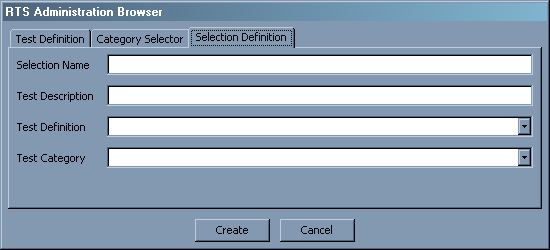
Selection Definition: A list of all of the tests that are to be run against a given build.
To create the results objects:
-
In the XPOZ GUI, click the icon
 .
.
-
Specify a name for the test, then click .
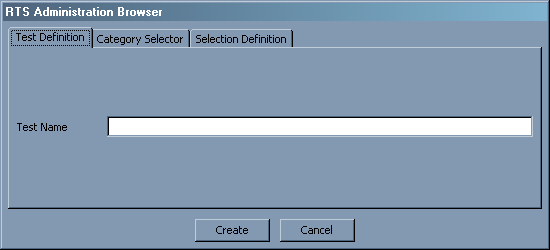
This creates a test definition and must be done for each unique test.
-
Click the tab.
-
Specify a name for the category, then click .
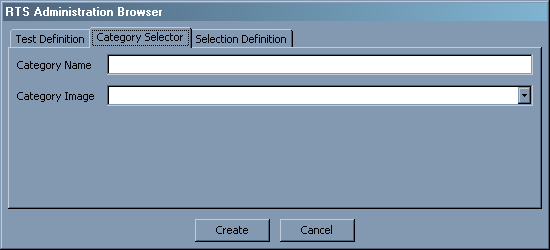
This creates a category selector and must be done for each unique separator.
-
Click the tab.
-
Specify a selection name. This is the definition that this test run is placed under.
-
Specify a test description. This is the description that is seen from the Web view.
-
Select a test definition from the drop-down list. This is the test that runs when this definition runs.
-
Select a test category image from the drop-down list, then click .
This creates or modifies a selection definition and adds the specified test.
-
Repeat steps 7 through 9 to add additional tests to the same definition.