3.3 Editing a Template in iManager
-
In iManager, click
 to display the Identity Manager Administration page.
-
In the list, click to display the list of e-mail templates included in the Default Notification Collection.
-
Click the e-mail template you want to edit.
-
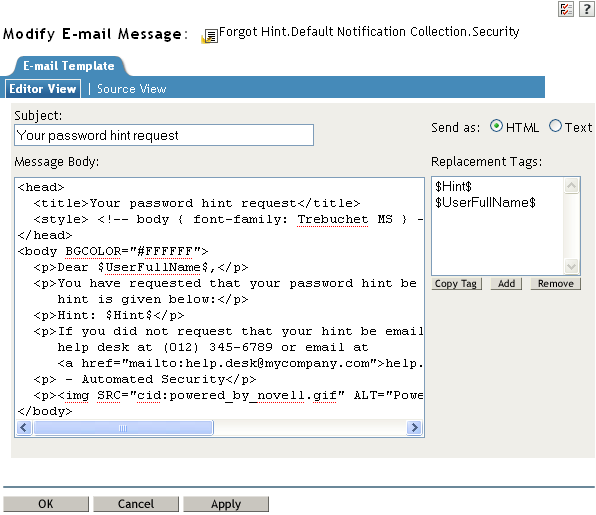
In the field, select whether to send the e-mail in HTML format or in text format.
-
In the field, type the text that you want users to see in the e-mail’s Subject line.
You can use replacement tags (tokens) in the field. To insert a replacement tag, select the tag in the list, click , place the cursor where you want to insert the tag, then press Ctrl+V. You can also simply type the tag in the message text. For information about adding new tokens, see Section A.0, Tokens and Replacement Tags.
-
In the box, type the message you want.
You can use replacement tags (tokens) in the Message box. To insert a replacement tag, select the tag in the list, click , place the cursor where you want to insert the tag, then press Ctrl+V. You can also simply type the tag in the message text. For information about adding new tokens, see Section A.0, Tokens and Replacement Tags.
-
To attach an image to an e-mail, follow Step 8 in Section 3.2, Editing a Template in Designer.
-
Click to save the template.