 previous
 next
next

This is a multi select drop-down field. This widget allows you to select more than one entity in an entity type. For example, user, group
Figure 2 Dynamic Entity
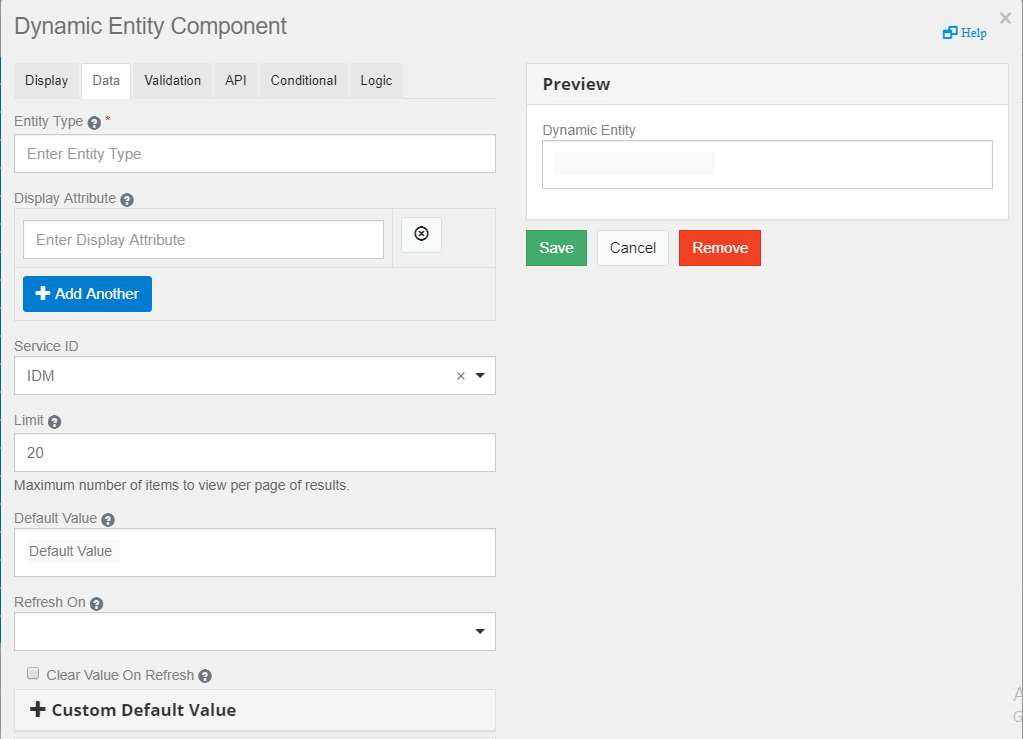
The following fields are populated in the tab:
Entity Key: Specify the entity key for the entity type. For example, for the entity type User, the entity key is user.
Display Expression Attribute: Specify the attributes of the entity type you want to be displayed. You can add multiple display attributes. For example, for the entity type User, the can be FirstName, LastName.
|
Entity Type |
Display Expression Attribute |
|---|---|
|
User |
FirstName, LastName |
Service ID: Select the service ID. For example, IDM or IG.
Limit: Specify the number of entities that you want to be displayed. The default value is 20.
Default Value: Specify the value to be displayed in the field before user interaction. Having a default value overrides the placeholder text.
Refresh On: Refreshes data when another field changes.